Coral Peach Pink Flower Watercolor: A Creative Resource for Designers and Makers
If you're working on a design project that calls for soft, elegant floral elements, you might have come across Coral Peach Pink Flower Watercolor. This digital asset collection offers a versatile range of floral graphics ideal for invitations, branding materials, educational content, and more. But while the aesthetic appeal is clear, understanding how to use these resources effectively—and avoid common pitfalls—can make all the difference in your final output.
What Is Coral Peach Pink Flower Watercolor?
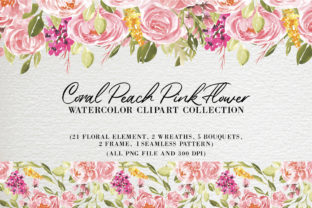
Coral Peach Pink Flower Watercolor is a digital design kit featuring a variety of floral elements rendered in a soft, flowing watercolor style. The collection includes 21 high-resolution PNG images of individual flowers and leaves, five bouquets, two wreaths, two decorative frames, and a seamless pattern in both PNG and JPG formats. Each image is created at 300 dpi with RGB color and transparent backgrounds, making them easy to layer and integrate into different design projects.
With each element measuring between 4000–6000 pixels on the longest edge, these graphics are suitable for both digital and print use. Whether you're a small business owner creating social media graphics or a professional designer working on a wedding invitation suite, these assets offer flexibility and visual appeal.
Common Mistakes When Using Coral Peach Pink Flower Watercolor
While this collection is rich in content and quality, many users—especially those new to design—make avoidable mistakes that can impact the effectiveness of their work. Here are some of the most frequent issues and how to address them.
1. Assuming All PNGs Are Interchangeable Across Platforms
Some creators assume that because the files are PNGs with transparent backgrounds, they’ll work perfectly in every design tool. However, not all software handles large PNG files the same way. Adobe Photoshop handles them smoothly, but tools like Canva or Figma may experience lag or compression issues when handling files over 5000 pixels.
Better approach: Resize the images to match your project's final output dimensions before importing them into your design software. This reduces file bloat and improves performance without sacrificing quality.
2. Overlooking Color Consistency in Projects
The Coral Peach Pink palette is delicate and warm, but it may not always align with your brand colors or the intended mood of your design. Some users apply these graphics without adjusting hues or saturation, which can lead to mismatched visuals.
Better approach: Use adjustment layers or color overlay tools in your editing software to harmonize the watercolor tones with your existing color scheme. This ensures a cohesive look across all design elements.
3. Using Seamless Patterns Without Proper Scaling
The seamless pattern included in the Coral Peach Pink Flower Watercolor set is a powerful asset, but it's often misused. Some users apply it at full size without tiling or scaling, which can cause distortion or pixelation when printed or displayed on larger screens.
Better approach: Test the pattern in a small area first. Adjust the scale so the repeat looks natural and doesn't overwhelm the design. For print projects, ensure the pattern resolution remains at 300 dpi even after scaling.
4. Ignoring Licensing and Usage Rights
Many users download and use digital assets without checking the licensing terms. While Coral Peach Pink Flower Watercolor is typically sold for both personal and commercial use, some licenses restrict resale or use in templates sold to others. Failing to verify this can lead to legal complications later.
Better approach: Always read the license agreement included with your purchase. If you're unsure, contact the seller for clarification before using the graphics in a commercial context.
How to Get the Most From Coral Peach Pink Flower Watercolor
To truly benefit from this design resource, it helps to approach it with intention and awareness. Here are some practical steps to ensure you're making the best use of these graphics.
- Check your software compatibility: Confirm that your design tool can handle large PNG files. If not, consider converting to JPG for certain uses where transparency isn't required.
- Test before committing: Try a few elements in a small test layout before building your full design. This helps you catch issues like color mismatch or layout imbalance early.
- Use layers wisely: Since the PNGs have transparent backgrounds, you can layer them creatively. Try placing a floral wreath behind text or using a bouquet as a border element.
- Optimize for performance: If you're using these graphics in a web project, compress the images appropriately without losing clarity to ensure fast loading times.
What to Check Before Downloading or Buying
Before purchasing Coral Peach Pink Flower Watercolor—or any digital design asset—take a few minutes to review what’s included and how it aligns with your needs. Here are the key points to verify:
- File types and formats: Make sure the package includes PNG and JPG files, especially if you need both transparent and compressed options.
- Resolution and size: Confirm that each element is 300 dpi and at least 4000 pixels on the longest side for print use.
- Number of elements: Review the exact count of bouquets, wreaths, frames, and patterns to ensure the collection offers enough variety for your project.
- Licensing terms: Know whether the license allows for personal, commercial, or extended use, especially if you're creating products for resale.
- Customer support: Look for a seller who offers support or replacement files in case of download issues or missing content.
Final Thoughts
Coral Peach Pink Flower Watercolor is more than just a pretty set of graphics—it's a practical toolkit for creators who want to add elegance and organic charm to their work. Whether you're designing a blog header, a greeting card, or a product label, these high-quality, transparent PNGs offer flexibility and visual appeal.
But like any creative tool, its value depends on how you use it. By avoiding common mistakes—like mismatched colors, oversized files, or overlooked licensing—you can ensure your designs look polished, perform well, and meet your project goals. Take the time to understand what's included, how it works, and how it fits your needs, and you’ll be well on your way to creating something beautiful.