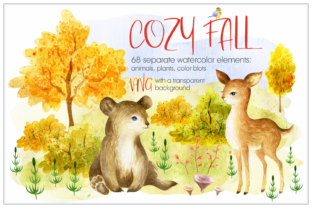
Cozy Fall: Watercolor Animals and Plants – A Creative Resource for Makers and Designers
Whether you're crafting greeting cards, designing digital layouts, or putting together scrapbook pages, the Cozy Fall. Watercolor Animals and Plants collection offers a versatile set of hand-painted watercolor illustrations. With 74 PNG files at 600dpi, including animals, mushrooms, trees, and floral elements, this package gives creators a rich visual toolkit to work with. Bonus materials like autumn wreaths and pre-made designs add extra value, making this a go-to resource for both personal and professional projects.
Understanding the Value of Cozy Fall Watercolor Illustrations
The Cozy Fall package is ideal for anyone who wants to infuse warmth and organic charm into their creative work. The watercolor style brings a soft, artistic quality that works well across multiple formats—from printed products to digital media. The transparent backgrounds make it easy to layer elements over different designs without unwanted borders or edges. Whether you're a blogger adding visual interest to a post or a small business owner creating seasonal branding materials, this collection provides flexibility and aesthetic appeal.
Common Mistakes When Choosing or Using Cozy Fall Watercolor Assets
Despite its usefulness, some users may overlook key details that affect how well the resource serves their needs. Here are some of the most common missteps and how to avoid them:
1. Not Checking File Resolution Before Use
One of the biggest oversights is assuming all included files are suitable for every purpose. While the 68 individual elements are at 600dpi—ideal for print and high-quality digital use—the bonus autumn wreaths and pre-made designs come at 300dpi. Using lower-resolution files for large-scale printing can result in blurry or pixelated output.
- Better approach: Always verify the intended use of each file. Save the 300dpi bonus designs for digital use or small-format prints like stickers or labels.
2. Overlooking File Organization
Some creators dive in without taking time to explore how the files are named and grouped. Without a clear system, it's easy to waste time searching for specific elements, especially when working on time-sensitive projects.
- Better approach: Take a few minutes to organize files into folders by category (e.g., animals, plants, wreaths). Rename files if needed to match your workflow or project themes.
3. Assuming All Elements Work Together Visually
While the illustrations share a cohesive theme, not all elements may blend seamlessly. Some users expect every animal and plant to coordinate perfectly without adjusting size, color, or placement.
- Better approach: Test combinations in your design software before finalizing layouts. Use subtle layering or color overlays to unify mismatched tones or styles.
4. Ignoring Licensing Details
Another overlooked detail is the permitted usage of the illustrations. Some designers assume they can freely use the assets for commercial resale or large-scale distribution without confirming the license terms.
- Better approach: Always read the licensing agreement included with the download. If commercial use is allowed, check for attribution requirements or usage limits.
How Mistakes Impact Creative Outcomes
These common errors can lead to wasted time, poor-quality results, or even legal issues. Using low-resolution files for print can make a professional project look amateurish. Poor organization slows down workflow and reduces productivity. Misunderstanding licensing terms can lead to costly violations. Each of these issues can diminish the value of the Cozy Fall collection and reduce user satisfaction.
Practical Tips for Getting the Most from Cozy Fall Watercolor Files
To ensure you're making the most of this resource, follow these practical suggestions:
- Preview Before You Print: Use digital mockups to test how illustrations will appear in printed formats. This helps catch resolution or layout issues early.
- Customize for Cohesion: Adjust brightness, contrast, or saturation to match elements that appear mismatched. This helps maintain a unified look across your design.
- Backup Your Files: Store a copy of the original zip folder in a secure location. Re-downloading or reorganizing later can be frustrating if files become corrupted or lost.
- Use Layers Wisely: Since all files have transparent backgrounds, experiment with layering to create depth and dimension without overcrowding your design.
What to Check Before Downloading or Purchasing
Before committing to the Cozy Fall. Watercolor Animals and Plants package, consider the following factors:
- File Size: At 171MB, this is a substantial download. Ensure you have enough storage space and a stable internet connection.
- Supported Software: Confirm that your design tools (like Photoshop, Illustrator, or Canva) support PNG files with transparent backgrounds.
- Usage Rights: Review the license to understand whether you can use the illustrations for personal, commercial, or resale purposes.
- Design Style: Make sure the watercolor aesthetic fits your brand or project tone. While charming and warm, it may not suit minimalist or ultra-modern designs.
Final Thoughts
The Cozy Fall. Watercolor Animals and Plants collection is a valuable asset for creators looking to bring a handcrafted, seasonal feel to their work. By understanding its components, avoiding common mistakes, and planning your use wisely, you can maximize both the visual impact and practical value of this resource. Whether you're a hobbyist scrapbooker or a professional designer, this package offers flexibility, quality, and inspiration for your next fall-themed project.